
The complete 7-step framework you'll walk away with — no fluff, no guesswork.
Okay real talk — if you've googled "competitor analysis," chances are you've already skimmed three articles that all say the same thing: "check their traffic, check their keywords, check their backlinks." Cool, thanks. But how? Where do you actually start, what tools do you open first, and what do you do with the data once you have it?
That's what this guide is actually for.
I run AnalyzeSERP, a free tool that pulls this exact kind of data, so I've spent way too many hours looking at competitor sites — mine and other people's. What I'm sharing here isn't theory, it's the actual process I use before writing a blog post or launching a new page: who's already winning this keyword, what are they doing right, and what's the gap I can fill.
No fluff, no "10x your growth" nonsense. Just a straightforward walkthrough you can follow today, even if this is your first time doing this.
Let's get into it.
What Is Competitor Analysis (And What It's Not)
Before we jump into the how-to, let's clear up something people mix up all the time — because it actually changes who you should be looking at.
Competitor analysis vs. competitive research
These two get used interchangeably, but they're not quite the same:
- Competitive research — the broad stuff: market size, pricing, positioning, who's raising funding, that whole picture
- Competitor analysis (what we mean here) — narrower and way more actionable: what's working for them in search — their content, their keywords, their backlinks. Stuff you can actually copy the logic of and apply to your own site by next week
SEO competitor vs. business competitor — these are not the same list
This one trips people up the most, so pay attention here. Your business competitor is whoever you'd mention if someone asked "who else does what you do?" Your SEO competitor is whoever's actually sitting on page 1 for the keywords you want to rank for — and honestly, half the time it's not even the same list.
I've seen people obsess over what "the big player in their industry" is doing, when the site actually eating their lunch on Google is some random niche blog nobody's heard of. That blog is who you should be studying.
The mistake almost everyone makes
Here's the trap: people analyze their brand rivals instead of their SERP rivals. You open up your biggest competitor's website, poke around their homepage, maybe check their pricing page — and call it a day. But if that competitor isn't actually ranking for the keywords you care about, you've basically wasted your time. You learned what they're doing, not what's working.
The fix is simple, and it's the whole point of this guide: go to Google, search your actual target keywords, and see who shows up. That list — not your assumptions — is where the real analysis starts.
Why Competitor Analysis Is the Fastest Shortcut in SEO
I'll be honest — when I was starting out, competitor analysis felt like busywork. Like something you do to look thorough before actually doing the "real" work of writing content. Turns out I had it backwards. It basically is the real work.
You're copying proof, not guessing
Here's the thing that changed my mind: when a page ranks on page 1, Google has already run the experiment for you. It's already told you what a "good enough" answer looks like for that keyword — what to cover, roughly how deep to go, what questions people are actually asking. You're not guessing anymore, you're reverse-engineering something that's already been validated.
Compare that to writing blind — sitting down and just... hoping your instincts about what readers want are correct. Sometimes they are. A lot of the time, you miss something obvious that a five-minute look at the top 3 results would've caught instantly.
It saves you from the blank-page problem
You know that feeling where you open a new doc, type a title, and then just... stare at it? Competitor analysis kills that. Instead of starting from nothing, you're starting from "here's what three sites are already doing, here's what they're missing, here's my angle." That's a completely different (and much easier) place to write from.
A quick example from my own site
When I was figuring out what to write on AnalyzeSERP's blog, I ran a few competitor URLs through my own tool — including a couple of the big SEO blogs — and noticed something. They all covered traffic, keywords, backlinks... the usual suspects. But almost none of them broke down heading structure or content density in a way a beginner could actually use. That gap became this exact article. That's the whole method in one example: find what's missing, not what's already been said a hundred times.

How to Find Your Real Competitors (Not the Obvious Ones)
Alright, let's get practical. This is step one of the actual process, and it's simpler than people make it sound.
Start with your seed keywords, not your industry
Pick 5-6 keywords you actually want to rank for — the ones you'd be thrilled to show up on page 1 for. Search each one on Google, and just... write down whoever keeps showing up. Not once, but across multiple searches. If the same 4-5 domains keep appearing, congratulations, you just found your real competitor list, no tool required.
Ignore the giants you can't touch (yet)
You'll probably see Wikipedia, Amazon, some massive publication, or Reddit sitting at the top for a bunch of your searches. Don't panic, and don't try to "compete" with them — that's not a realistic fight right now. What you're looking for are the sites that are beatable: smaller blogs, niche tools, sites roughly your size or a bit ahead. Those are the ones actually worth studying line by line.
How many is actually worth tracking
You don't need 20 competitors:
- 3-5 core competitors — sites that show up again and again for your main keywords, check these regularly
- 1-2 aspirational competitors — a level above you, just to see where you could be in a year
Any more than that and you're just collecting data you'll never actually use.
A quick way to speed this up
Instead of manually Googling and copy-pasting URLs into a spreadsheet (which, let's be honest, gets old fast), you can drop your target keyword or a competitor's URL straight into AnalyzeSERP and get the breakdown in one shot — no more tab-hopping between ten browser windows.
Run Free Competitor Keyword Gap Audit
Compare up to 5 URLs side-by-side. Extract missing 1-gram, 2-gram, and 3-gram terms instantly.
Traffic & Visibility Analysis
Okay so now you've got your list of 3-5 real competitors. Next question: how big is this fight, actually? That's what traffic and visibility tell you.
Getting a rough traffic estimate
You don't need exact numbers here — nobody outside the company actually has those anyway, even the paid tools are estimating. What you want is a ballpark: is this competitor pulling in a few hundred visitors a month, or tens of thousands? That single number changes how seriously you take them. A site with barely any traffic ranking above you? That's actually good news — it means the keyword's beatable.
Traffic isn't the same as visibility
Here's something that took me a while to get — a site can have decent traffic from one or two lucky viral posts, while barely showing up anywhere else. That's traffic without visibility. What you actually want to check is how consistently they show up — across many keywords, many pages — not just whether one post happened to blow up once.
The traffic that doesn't actually mean anything
Not all traffic is worth chasing. I've seen sites with huge numbers that are 90% people searching something totally unrelated to what they sell — like a recipe blog that happened to rank for a random informational term with no buying intent at all. Before you get intimidated by a competitor's traffic number, check what it's coming from. If it's not the kind of traffic that would ever convert for them (or you), it's not really a threat, it's just a big number.
Keyword Gap Analysis
This is probably my favorite part of the whole process, because it's the closest thing to "free content ideas" you'll ever get.
What a keyword gap actually is
Simple idea: pull up the keywords a competitor ranks for, then check which ones you're not ranking for at all. That difference — that gap — is basically a list of blog posts and pages someone else already proved people are searching for. You're not guessing what to write next, you're picking from a list that's already validated.
Not every gap is worth chasing
Here's where people mess this up — they see a huge list of gap keywords and try to write for all of them. Don't. I use a rough gut-check for each one:
- Does it have real search volume (even a few hundred a month is fine)?
- Is the competition actually low enough that I could realistically break in?
- Does it genuinely match what my site is about?
If a keyword fails on any of those, skip it — no point writing a page nobody will find or that doesn't fit your site anyway.
Long-tail vs. head terms
Head terms (like "competitor analysis" itself) are the ones with big volume and big competition — worth going after eventually, but slow. Long-tail versions ("competitor analysis for small business," "free competitor analysis tool") are lower volume but way easier to actually rank for, especially early on. My honest advice: stack up a bunch of long-tail wins first, then use those as internal links pointing back to your head-term page. It builds authority before you try to win the harder fight.
Turning this into an actual content plan
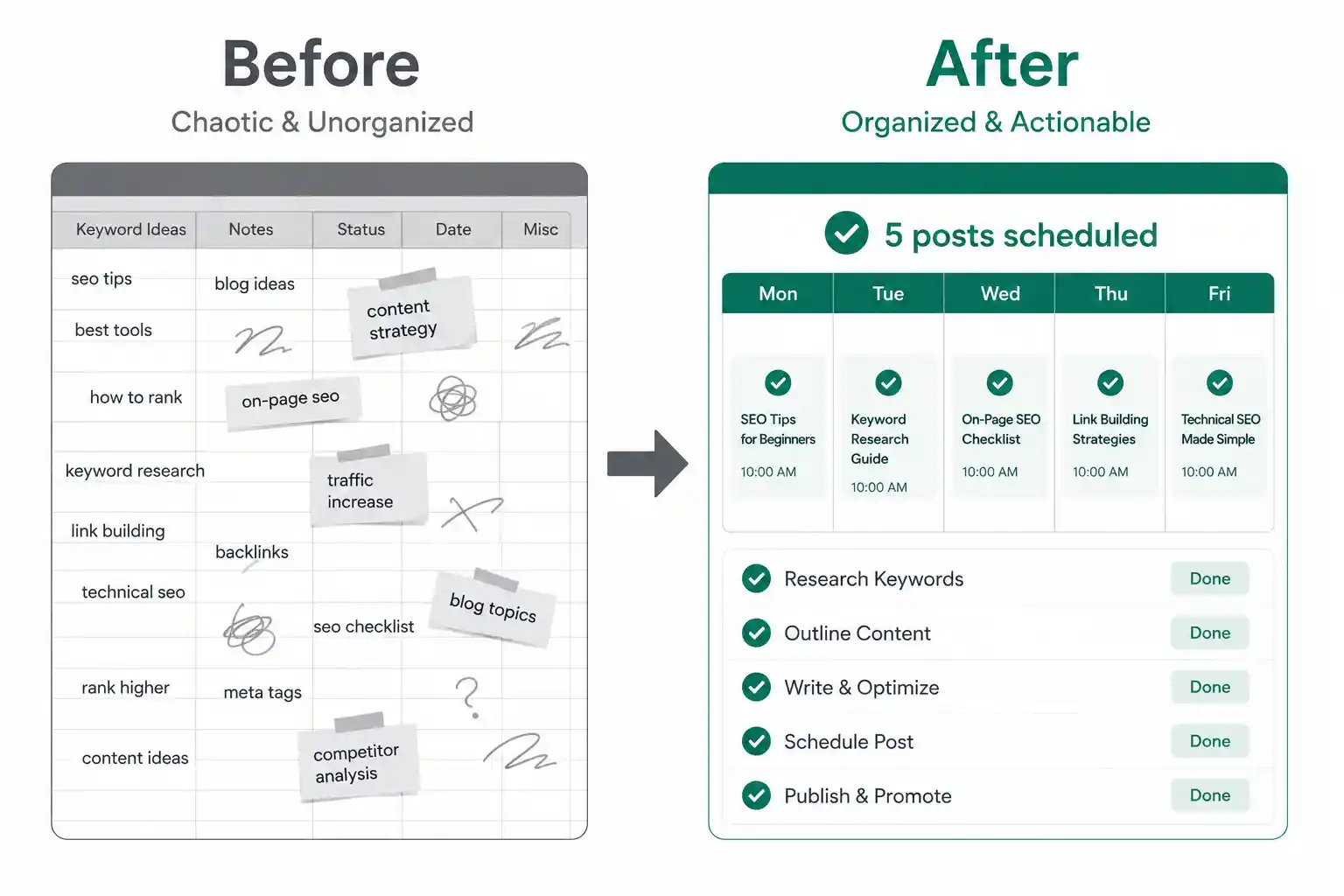
Don't just leave your keyword gaps sitting in a spreadsheet forever — that's where good research goes to die. Group them by topic, pick the 3-5 with the best volume-to-competition ratio, and just... schedule them. One a week, one every two weeks, whatever's realistic for you. A messy list of 50 keywords is useless. A plan for the next 5 posts is not.
Content & Heading Structure Analysis
This is the part most guides skip, and honestly, it's the one that changed how I write blog posts the most.
Why headings matter more than people think
Your H1, H2, H3s aren't just formatting — they're basically a map of what Google (and readers) expect a "complete" page to cover for that topic. When three different top-ranking pages all have a section on, say, "how to check backlinks," that's not a coincidence. It's a strong signal that anyone searching that keyword expects to see that covered. Skip it, and your page feels incomplete even if the rest of it is great.
How to reverse-engineer a "complete" page
Open up the top 3 results for your target keyword and just list out their headings, side by side. You'll start noticing patterns fast:
- Sections that show up in all three — non-negotiable, you need those
- Sections only one of them has — your opportunity to cover something they missed, so your page ends up more complete than any single competitor's
Length isn't the goal, depth is
I want to be clear here — this isn't about writing 5000 words because a competitor did. I've seen plenty of short pages outrank bloated ones because they actually answered the question instead of padding around it. What matters is whether you've covered every angle someone searching that term would want — not how many words it took you to do it.
Where keyword density actually helps
This part's a little more technical but stick with me. When you break down a competitor's page into word and phrase frequency (2-grams, 3-grams, that kind of thing), you start seeing exactly which terms and phrases they're leaning on — not just the main keyword, but the supporting language around it. That's genuinely useful, because it shows you the vocabulary the topic expects, not just the topic itself. This is one of the things I built directly into AnalyzeSERP, because eyeballing this manually across multiple competitors gets tedious fast.
Backlink Profile Analysis
Backlinks are one of those things people keep saying is "dead" every year, and yet somehow they still matter every year. Let's not overthink it — here's how to actually use this.
Why backlinks are still worth your time
Think of a backlink as a vote of trust from another site. Google's been using this signal for decades because it's genuinely hard to fake at scale — anyone can stuff keywords onto a page, but getting a real site to link to you takes actual effort or actual merit. That's exactly why it still counts.
Not all links are worth chasing
Don't go link-hunting blindly. Some links move the needle way more than others:
- A mention from a relevant blog in your niche
- A solid directory listing
- A guest post on a site your audience actually reads
A random low-quality link from some spammy site? Skip it, it's not helping and might even hurt.
Find the "easy" competitors first
Here's a trick that saves a ton of time: look at where each of your competitors is getting linked from, and ask yourself honestly — could I realistically get that same link? Directories, "best tools" roundup posts, guest post opportunities — these show up constantly in competitor backlink profiles, and most of them will happily list you too if you just ask.
A simple way to actually reach out
Once you've found a link opportunity, don't overthink the outreach. Something short and honest works better than a stiff template: mention the specific page you found them on, explain in one line why your site/tool fits there too, and ask directly. No need for five paragraphs — busy site owners skim, so get to the point fast.
Site Architecture & Internal Linking
This one's less flashy than backlinks or keywords, but honestly, it's the part that quietly makes or breaks how well your content actually performs.
How competitors organize their categories
Open up a competitor's site and just browse it like a regular visitor would. Are their blog categories tight and focused, or is everything dumped into one giant "Blog" section with no real structure? Sites that group related content clearly — say, all their "SEO basics" posts under one category, all their "tool comparisons" under another — tend to build topical authority faster, because Google can clearly see they've gone deep on a subject instead of writing about ten unrelated things.
Internal linking patterns worth stealing
Pay attention to how competitors link between their own pages. A well-linked site usually has a "pillar" page (like this one) surrounded by a bunch of smaller, specific posts all linking back up to it — and the pillar linking back down to them too. That web of links tells Google "these pages are all related, and this one's the main one." If you notice a competitor doing this well, it's worth mapping out how your own content could follow the same pattern.
What URL structure quietly tells Google
Little detail, but it adds up: URLs like /blog/how-to-do-keyword-research tell both users and Google exactly what's on the page before they even click. Compare that to something like /blog/post-4521 — completely meaningless. If you notice your competitors keeping their URLs clean and topic-based, that's a pattern worth copying, especially if your own site's URLs have gotten messy over time.
On-Page & Technical Quick Checks
This part doesn't need a deep dive — just a quick pass over each competitor to catch the small stuff that adds up.
Title tags and meta descriptions
Look at how the top-ranking pages write their titles. Do they lead with the keyword? Add a year, a number, a promise ("free," "step-by-step," "in 10 minutes")? You'll usually spot a pattern fast — and it's a good hint at what's actually getting people to click in the search results, not just what's ranking.
Run Free Competitor Keyword Gap Audit
Compare up to 5 URLs side-by-side. Extract missing 1-gram, 2-gram, and 3-gram terms instantly.
Page speed, quickly
You don't need to run a full technical audit here — just get a rough sense of whether your competitor's pages load fast or feel sluggish. If a slower competitor is still outranking you, that's actually encouraging — it means speed probably isn't the deciding factor for that keyword. If most top results are fast and yours isn't, that's worth fixing before anything else.
Schema markup you might be missing
Peek at the page source (or just use a free schema checker) to see if competitors are using things like FAQ schema, review stars, or breadcrumbs. These show up as those extra bits in search results — stars, dropdown questions — and they can boost your click-through rate even without moving your ranking position. If competitors have it and you don't, it's a quick, low-effort win to add.
Putting It All Together — A Repeatable Framework
Okay, that was a lot of steps. Let's compress it into something you can actually glance at next time you sit down to do this, instead of scrolling back through the whole article.
The condensed checklist
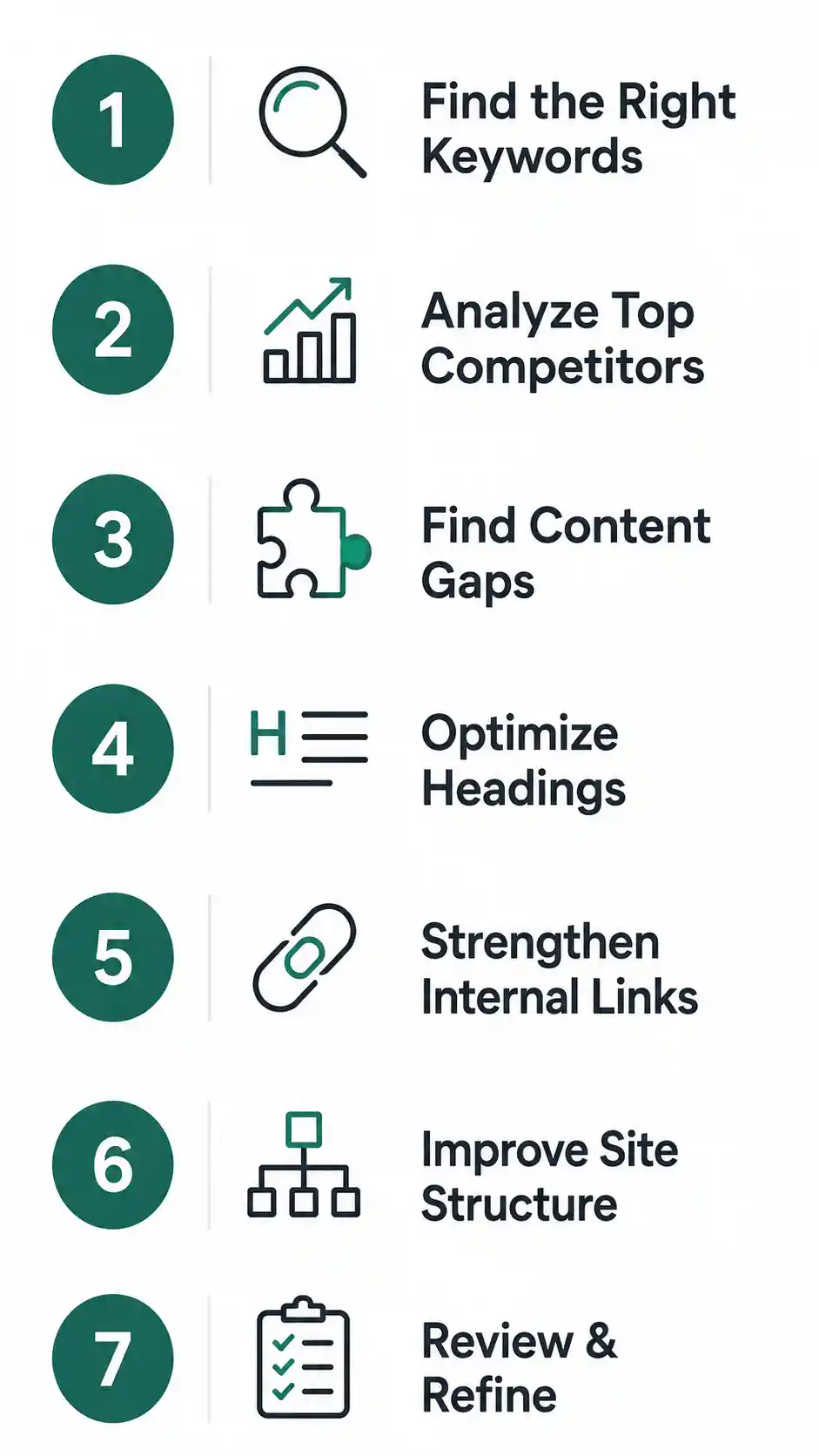
- Search your target keywords, note who keeps showing up — that's your real competitor list
- Get a rough sense of their traffic and visibility, not just one lucky post
- Pull their keyword list, find the gaps, and rank them by volume, competition, and relevance
- Study their heading structure and content depth, don't just count words
- Check where their backlinks are coming from and find the realistic ones
- Look at how their site's organized — categories, internal links, URLs
- Do a quick pass on titles, speed, and schema
That's it. Seven steps, and none of them individually take that long once you know what you're looking for.
How often to actually do this
You don't need to run this every week — that's overkill and honestly kind of exhausting. Once every 2-3 months per competitor is plenty, or whenever you're about to write a new piece of content and want to check what's already out there. Rankings shift slowly enough that a quarterly check keeps you current without turning into a full-time job.
Don't let it just sit there
Here's the part people skip: doing the analysis and then never acting on it. A folder full of screenshots and spreadsheets doesn't help your rankings — writing the post, fixing the heading, sending the outreach email does. Every time you finish a round of analysis, force yourself to pick at least one concrete action before moving on. Even one small change beats a perfect report that never gets used.
Free Tools to Do This Without Paying for a Full Suite
Look, most of what we just walked through gets sold as an expensive monthly add-on by the big SEO platforms. You don't need that to get started — here's what actually works for free.
AnalyzeSERP for the heavy lifting
This is genuinely why I built AnalyzeSERP in the first place — I was tired of the parts of this process that take forever to do manually. Drop in a competitor's URL or your target keyword, and it pulls the heading structure, keyword density, and content breakdown we covered in the sections above — the stuff that normally means opening ten tabs and eyeballing everything by hand. No signup wall for your first report.
A few others worth pairing it with
- Google Search Console — free, and it's literally your own site's data straight from Google. Non-negotiable, use it regardless of anything else.
- AlsoAsked — great for seeing the actual questions people search around your topic, useful for filling out FAQ sections.
- AnswerThePublic (free tier) — similar idea, good for finding long-tail angles you might've missed.
- Ubersuggest (free tier) — decent for a rough keyword volume gut-check when you just need a quick number, not a full report.
When it's actually worth paying
I'm not going to pretend paid tools like Semrush or Ahrefs don't add value — they do, especially once you're managing dozens of pages or need historical trend data going back years. But if you're just starting to take competitor analysis seriously, you genuinely don't need to spend a cent to get the core of this process done well.
Common Competitor Analysis Mistakes to Avoid
Before you go run this whole process, let me save you from a few things I've personally messed up (or watched other people mess up) more than once.
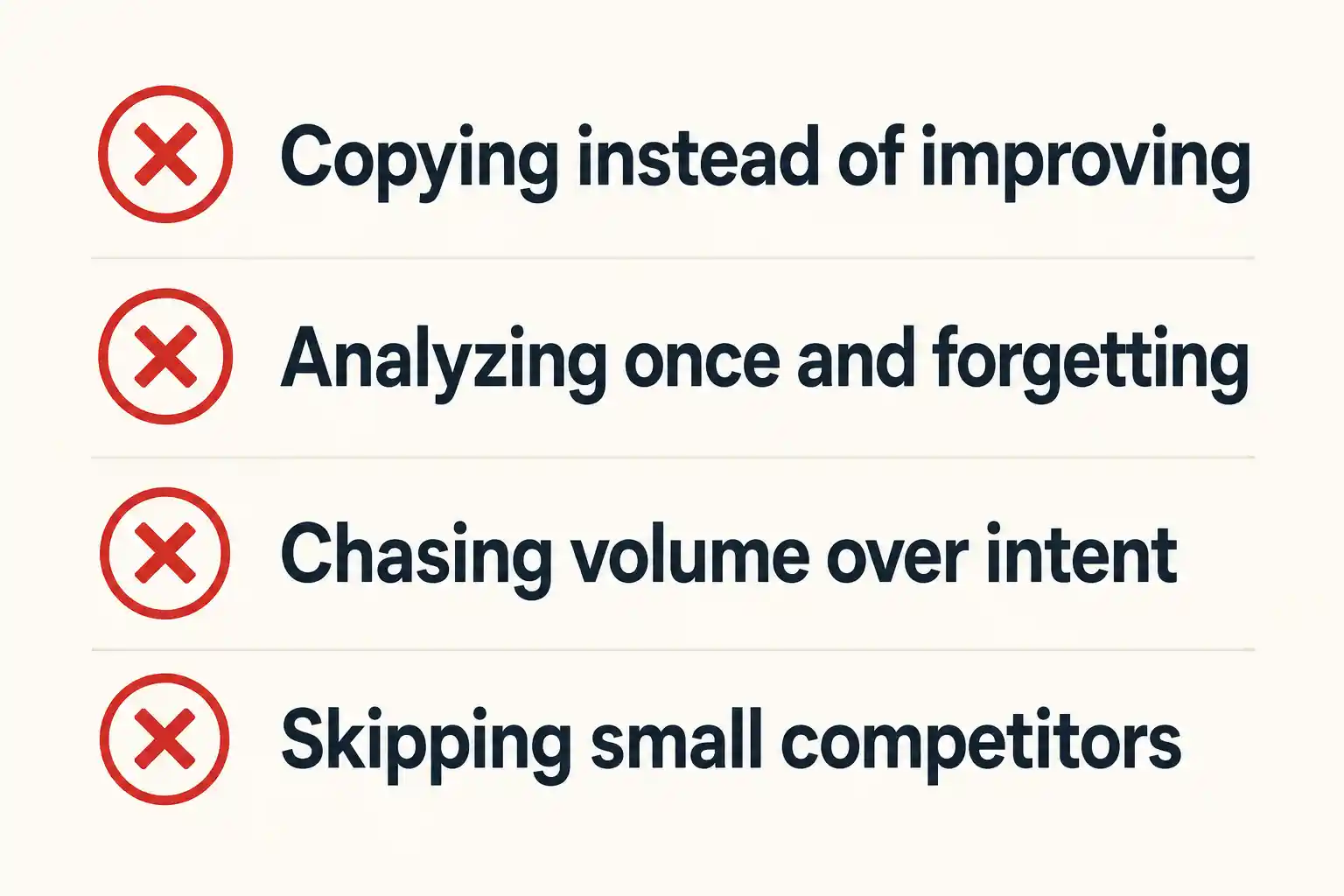
Copying instead of improving
The point was never to clone what's already ranking — Google doesn't need two identical pages, it already has one. If your "analysis" just turns into rewriting a competitor's post with different words, you're not offering anything new, and you shouldn't expect a different result. Use what you find as a floor, not a finish line — cover everything they do, then add the thing they missed.
Doing it once and forgetting about it
I get it, it feels like a project with a clear end. But rankings shift, competitors update their content, new sites show up out of nowhere. A competitor analysis from eight months ago is basically stale information at this point. Treat it as something you revisit, not a one-time checkbox.
Chasing volume and ignoring intent
It's tempting to go straight for the keyword with the biggest search number on the list. But if that keyword's intent doesn't actually match what you offer — say it's mostly informational searches and you're selling a tool — you'll get traffic that never converts. Volume looks good in a spreadsheet; intent is what actually pays off.
Skipping the "small" competitors
It's natural to fixate on the biggest name in your space, but honestly, the smaller, less obvious competitors are usually where the easiest wins are hiding. They're the ones you can realistically outrank soon, not in some hypothetical future. Don't let the big player distract you from the sites you can actually beat right now.
FAQs
How often should I do a competitor analysis?
Every 2-3 months for your key competitors is a solid rhythm, or whenever you're about to write something new and want to check the current landscape first. No need to do it weekly — rankings just don't move that fast.
What's the difference between a competitor analysis and a SWOT analysis?
A SWOT analysis is broader — it covers your whole business, strengths, weaknesses, opportunities, threats, all of it. A competitor analysis (like this guide) zooms in specifically on search: what's ranking, what's missing, what you can realistically win.
Can I do competitor analysis for free?
Yes, completely. Google Search Console, tools like AnalyzeSERP, AlsoAsked, and the free tiers of a few others cover everything walked through in this guide. Paid tools help you scale later, but they're not required to start.
How many competitors should I analyze?
3-5 you check regularly is plenty for most sites. Adding 1-2 "aspirational" ones — a step ahead of you — is useful too, but past that you're mostly just collecting data you won't act on.
What's the best free competitor analysis tool?
Depends what you need — Google Search Console for your own data, AnalyzeSERP for pulling a competitor's heading structure and keyword density, AlsoAsked for question-based content ideas. Using two or three together usually beats relying on just one.
Ready to Actually Do This?

That's the whole process — find the right competitors, understand their traffic, spot the keyword gaps, study their structure, check their backlinks, and turn all of it into an actual plan instead of a report that sits in a folder somewhere.
Run Free Competitor Keyword Gap Audit
Compare up to 5 URLs side-by-side. Extract missing 1-gram, 2-gram, and 3-gram terms instantly.
If you want to skip the manual digging, go run a free report on AnalyzeSERP — no signup needed for your first one. Start with just one competitor and see what turns up.